You may have noticed that our website looks a little different. We have updated the design of our website. All of the same content is still there, but it looks a little different. If you find yourself confused by the new look or can’t find what you’re looking for, then this tutorial will help you re-orient yourself.
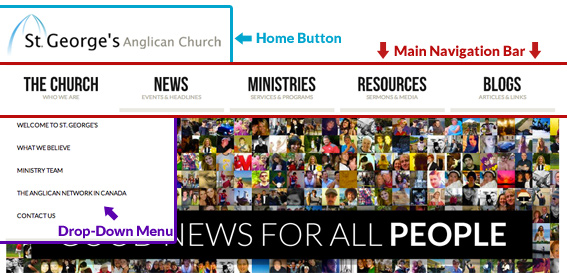
Header (Pictured Above)
The Header content appears on every page of our website.
Main Navigation Bar
The main navigation bar appears on every page of the website. From here you can navigate to any of the major pages on the website. The main navigation bar is separated into 5 major categories – The Church, News, Ministries, Resources, and Blogs. Inside of each of these categories are sub-categories, which can be accessed through each buttons drop-down menu.
Drop-Down Menu
When you roll your mouse cursor over one of the buttons in the main navigation bar (i.e. ‘The Church’, ‘News’, etc.) a drop-down menu will ‘drop down’ from the button. This will display the subcategories of the button. In the image above, you can see the drop down menu of The Church button. Each of the items in the drop-down menu are links to individual pages.
Home Button
The Home Button (The St. George’s Logo) is located on every page of the website and clicking on it will take you back to our website’s homepage.
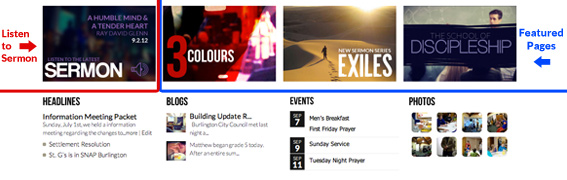
Home Page Content (Pictured Above)
The home page content only appears on our homepage.
Sermon
You can listen to the latest sermon by clicking on the sermon box. The sermon will automatically begin to play.
Featured Pages
There will be several featured pages to the right of the sermon box. They are links to pages on our website that we want to specifically emphasize.
Headlines
The headlines box displays the 3 latest news items on the website. Click on the title of one of the news items to read the entire article. Click on the ‘Headlines’ title to see all of the news items on the website.
Blogs
The blogs box shows the 2 latest blog posts on the website. Click on the title of the blog post to read the entire article.
Events
The events box shows the 4 next upcoming events of the church. Click on one of these events to find out more information.
Photos
The photos box shows the latest photos from our photos page. Click on one of the photos to see a larger version. Click on the ‘Photos’ title to go the photos page, where you can view all of the photo albums on the website.

Footer (Pictured Above)
The footer content below appears on every page of our website.
Search bar
You can search for anything on the website in the search bar. Click inside of the search bar and type in a whatever you’d like to search for and press ‘enter’ on your keyboard. The website will then take you a to a search results page with links pages that fit your search terms.
Social Network Pages
You can follow St. George’s on both Facebook and Twitter. Click on one of these buttons to go to our facebook or twitter pages.
Email Notifications
You can receive email notifications of the new content on our website. Click on the ‘notify’ button to begin the sign-up process.